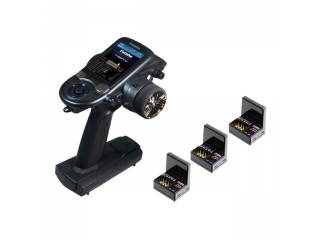
6PV EP Triple Receiver Set (R404SBS-E x 3)
- JAN code:
-
4513886040610
- Item code:
-
00008731-3
- Maker price:
-
\73,700 JPY
- Sale price:
-
\58,960 JPY
- Manufacture:
- FUTABA
- Weight:
- 1,200g
- Categories:
- TX SET
A high-mid-range model featuring ultra-fast response capabilities.
This mid-to-high-class transmitter combines the operability of the T4PM Plus with elements from the T10PX.
A full-color display enables intuitive operation.
Compatibility with the ultra-fast F-4G system makes the Feeling Function—which provides a sense of stability during control—even more noticeable.
¡úThe T6PV is compatible with F-4G. T-FHSS. S-FHSS. and MINI-Z systems.
¡úThe R404SBS and R404SBS-E are receivers compatible with the F-4G system.
[Product Features]
¡ü High-speed response approaching that of the T10PX. thanks to the F-4G system and UR mode (*Note 1).
¡ü Equipped with six systems: F-4G. T-FHSS. S-FHSS. MINI-Z EVO. MINI-Z EVO2. and MINI-Z FHSS.
While T-FHSS SR mode is not supported. servo SR mode can still be utilized via the F-4G systems servo settings.
¡ü Model Types include Normal. Big. and Drift.
¡ü Includes settings for crawlers.
¡ü Feeling Adjustment Function: Enhances drivability by adding a milder feel while still leveraging the high-speed response.
¡ü Supports up to 6 channels (*Note 2).
¡ü Class-leading light weight and highly balanced design.
¡ü Equipped with a microSD card slot.
MicroSD cards are used for saving model and telemetry data. displaying photos of your car on the transmitter.
performing software updates. and more.
(MicroSD card sold separately; supports SD/SDHC; SDXC not supported.)
¡ü Features a new wheel unit. APA (*Note 3). APA Angler. and trigger.
¡ü Grip Rubber: In addition to the included size (M). you can choose a size that fits you best from optional grip rubbers (S or L). ¡ü Wheel position adjustable via Steering APA (Included: Steering APA (24.0) & Angle Spacer (5¡ë))
¡ü Setup via high-brightness. wide-viewing-angle full-color LCD and jog key
¡ü Body catch pin holder equipped at the base of the grip (Body catch pin not included)
¡ü Powered by dry-cell batteries (AA). Compatible with separately sold LiFe batteries (FT2F1100B. FT2F1700B V2. FT2F2100B V2).
When using LiFe batteries. the non-contact charger (LF-02) is also compatible.
Also compatible with separately sold LiPo (LT2F2000B) and NiMH (HT5F1800B) transmitter batteries.
¡ü Extensive range of optional parts available for customization
*Note 1: Ensure the servo used is compatible with UR mode.
*Note 2: When using channels 5 and 6 in F-4G mode. connect an S.BUS2 servo or SBD-2 to the S.BUS2 port of the R404SBS/R404SBS-E receiver.
*Note 3: Adjustable Positioning Adaptor (adapter for changing position)
[Functions/Specifications]
¡ú Setup Menu
¡ü Receiver settings (Compatible with F-4G / T-FHSS / S-FHSS. and MINI-Z)
Please refer to the manufacturers website for the list of compatible Futaba receivers for each system.
MINI-Z compatibility includes MINI-Z EVO / MINI-Z EVO2 / MINI-Z FHSS (*Note 1).
Telemetry functions are available only in F-4G / T-FHSS / MINI-Z EVO2 bidirectional modes.
*Note 1: MINI-Z FHSS requires the MINI-Z FS-RM005 module (manufactured by Kyosho Corporation). ¡ü Servo View: Allows you to check the servo operation for all channels. Useful for verifying movement after configuring steering angle adjustments or mixing functions.
¡ü Throttle Mode: Allows you to set the neutral brake function. which applies the brake when the throttle trigger is in the neutral position.
¡ü Reverse: Determines the operating direction of servos and other equipment in response to inputs from the transmitters steering. throttle. channels 3/4. and other auxiliary channels.
¡ü Sub-Trim: Used during model assembly to fine-tune the neutral position of the servo horn when connecting it to components via linkage rods.
¡ü End Point: Used to adjust the travel limits of the linkage. including left/right steering angles. throttle high/brake travel amounts. and up/down travel amounts for channels 3/4 and other auxiliary channels.
¡ü Failsafe Function: Sets the servo operating position for situations where the receiver loses the transmitter signal or the receiver battery voltage drops.
Failsafe. Hold. and OFF modes are automatically cancelled once the signal from the transmitter is received again.
¡ü Acceleration: Allows independent adjustment of the throttle response characteristics (forward and brake sides) near the neutral position.
¡ü Trim/Dial Settings: Allows you to assign functions to the digital trims (DT1–DT6) and the dial (DL1).
¡ü Switch Settings: Allows you to select functions and configure operation modes for the push switches (SW1–SW3).
¡ü Idle Up: Increases the idle speed when starting the engine of an engine-powered car or boat. thereby improving engine startability. This function is also effective for preventing the braking effect that occurs when the throttle is released while driving—an issue often caused by gear ratio settings or the specific motor used in electric RC cars.
However. when using models such as the MC971CR. MC970CR. MC960CR. MC950CR. MC851C. MC602C. or MC402CR. please ensure the ESC has recognized the neutral position and is ready for operation before turning on the idle-up function switch (similar to the procedure for the neutral brake function).
¡ü D/R. ATL
¡ü Channel Setting: A function to assign steering or throttle control to any desired channel.
This is useful when you want to operate steering or throttle via a different channel.
or when you want another channel to perform the same action as the steering or throttle.
¡ú Model Menu
¡ü Model Select. Model Copy
¡ü Model Name
¡ü Model Delete (on SD card)
¡ü Data Reset
¡ü Model Type: Allows you to utilize initial settings optimized for specific vehicle types. such as 1/5 scale models or drift cars.
¡ú Mixing Menu
¡ü Steering Mixing
¡ü Brake Mixing
¡ü Gyro Mixing
¡ü 4WS Mixing
¡ü Dual ESC
¡ü CPS Mixing (1. 2. 3): Allows configuration of LED lighting patterns and other settings when using the CPS-1 (optional).
¡ü Tank Mixing: Mixing designed for tracked vehicles. such as tanks.
¡ü Program Mixing (1. 2. 3. 4. 5): Allows telemetry data to be set as the master source for mixing.
¡ü Winch Mixing: Mixing useful for crawler vehicles.
¡ú Racing Menu
¡ü Curve (EXP): Allows independent settings for steering. throttle. and brake.
¡ü Speed: Allows independent settings for steering and throttle. ¡üTraction Control: By pulsing the throttle operation. this allows for smooth handling and helps maintain the ideal racing line. Additionally. for drift cars. pulsing the motor near the high-point range can simulate the sound of a rev limiter.
¡üA.B.S.: In vehicles such as full-time 4WD models. braking while cornering often causes understeer; using this function allows you to navigate corners smoothly.
¡üStart: Simply by operating the throttle trigger slowly—without losing traction—the system automatically switches from the current trigger position to a preset point. enabling a smooth start.
¡üEngine Cut: A function that moves the throttle servo to a preset position (engine cut position) to stop the engine via a switch.
¡üFeeling: A function to adjust the servo response if it feels too sensitive or difficult to control. Setting it toward Mild slows the response. while setting it toward Aggressive speeds it up. Turning Feeling adjustment OFF results in the fastest possible response.
¡üDrag Race (Trans-Brake): Allows for sharp acceleration by holding the vehicle stationary with the throttle (trigger) fully open and then releasing the trans-brake.
¡úAccessory Menu
¡üTimer: Choose from four types of timers: Up Timer. Fuel Down Timer. Lap Timer. and Lap Navigate Timer.
¡üLap List: Access this to view lap memory data (individual lap times) recorded using the Lap Timer function.
¡üS.BUS Servo: A dedicated function for modifying parameters of Futaba S.BUS/S.BUS2 servos.
¡üUR Servo Setting Changes
¡üMC (ESC) Link: Allows for the configuration of ESC settings. ¡ü Gyro Link: Configure gyro settings.
¡ü Rollout Chart: Display a rollout chart for DD (Direct Drive) cars.
¡ü Gear Ratio Chart: Calculate and display the final gear ratio based on the input pinion gear. spur gear. and gearbox secondary reduction ratio.
¡ü END/DIR Button Settings: Customize the END/DIR buttons to act as shortcuts for your preferred menu functions.
¡ü Home Screen Display Settings: Customize the layout and information displayed on the home screen.
¡ü Custom Menu Editing: Create your own menu containing frequently used functions.
¡ü Warning Displays: Low battery alarm. power-off reminder. and mixing (MIX) warnings.
¡ú System Menu
¡ü Display Settings: Adjust settings such as backlight brightness and dimming time.
¡ü System Information: Set the user name and select the display language and telemetry units using the jog key; also displays the software version.
¡ü Buzzer: Adjust the pitch of operation sounds (switches. trims. jog key) and warning alarms.
¡ü Battery Settings: Configure the battery type to ensure the correct low-voltage alarm threshold.
¡ü Total Timer: Display the cumulative power-on time on the home screen.
¡ü LED Settings: Adjust the brightness and lighting mode (always on. off. or linked to backlight) of the pilot LED.
¡ü Adjuster: Calibrate the neutral position and operating angle range for the steering wheel and throttle trigger.
¡ü Receiver Update: Perform firmware updates via the transmitter.
¡ÚIncluded Accessories¡Û
¡ü Wheel Position Change Adapter (APA-M) x 1
¡ü Mounting Screw Set x 1
¡ü Wheel Adapter (32¡ë) x 1
¡ü Brake Lever L x 1
¡ü Angle Spacer (5¡ë) x 1
¡ü Large-Diameter Steering Wheel x 1
¡ü UR / SR Labels
¡ü Instruction Manual x 1
¡ü Hex Wrench



This mid-to-high-class transmitter combines the operability of the T4PM Plus with elements from the T10PX.
A full-color display enables intuitive operation.
Compatibility with the ultra-fast F-4G system makes the Feeling Function—which provides a sense of stability during control—even more noticeable.
¡úThe T6PV is compatible with F-4G. T-FHSS. S-FHSS. and MINI-Z systems.
¡úThe R404SBS and R404SBS-E are receivers compatible with the F-4G system.
[Product Features]
¡ü High-speed response approaching that of the T10PX. thanks to the F-4G system and UR mode (*Note 1).
¡ü Equipped with six systems: F-4G. T-FHSS. S-FHSS. MINI-Z EVO. MINI-Z EVO2. and MINI-Z FHSS.
While T-FHSS SR mode is not supported. servo SR mode can still be utilized via the F-4G systems servo settings.
¡ü Model Types include Normal. Big. and Drift.
¡ü Includes settings for crawlers.
¡ü Feeling Adjustment Function: Enhances drivability by adding a milder feel while still leveraging the high-speed response.
¡ü Supports up to 6 channels (*Note 2).
¡ü Class-leading light weight and highly balanced design.
¡ü Equipped with a microSD card slot.
MicroSD cards are used for saving model and telemetry data. displaying photos of your car on the transmitter.
performing software updates. and more.
(MicroSD card sold separately; supports SD/SDHC; SDXC not supported.)
¡ü Features a new wheel unit. APA (*Note 3). APA Angler. and trigger.
¡ü Grip Rubber: In addition to the included size (M). you can choose a size that fits you best from optional grip rubbers (S or L). ¡ü Wheel position adjustable via Steering APA (Included: Steering APA (24.0) & Angle Spacer (5¡ë))
¡ü Setup via high-brightness. wide-viewing-angle full-color LCD and jog key
¡ü Body catch pin holder equipped at the base of the grip (Body catch pin not included)
¡ü Powered by dry-cell batteries (AA). Compatible with separately sold LiFe batteries (FT2F1100B. FT2F1700B V2. FT2F2100B V2).
When using LiFe batteries. the non-contact charger (LF-02) is also compatible.
Also compatible with separately sold LiPo (LT2F2000B) and NiMH (HT5F1800B) transmitter batteries.
¡ü Extensive range of optional parts available for customization
*Note 1: Ensure the servo used is compatible with UR mode.
*Note 2: When using channels 5 and 6 in F-4G mode. connect an S.BUS2 servo or SBD-2 to the S.BUS2 port of the R404SBS/R404SBS-E receiver.
*Note 3: Adjustable Positioning Adaptor (adapter for changing position)
[Functions/Specifications]
¡ú Setup Menu
¡ü Receiver settings (Compatible with F-4G / T-FHSS / S-FHSS. and MINI-Z)
Please refer to the manufacturers website for the list of compatible Futaba receivers for each system.
MINI-Z compatibility includes MINI-Z EVO / MINI-Z EVO2 / MINI-Z FHSS (*Note 1).
Telemetry functions are available only in F-4G / T-FHSS / MINI-Z EVO2 bidirectional modes.
*Note 1: MINI-Z FHSS requires the MINI-Z FS-RM005 module (manufactured by Kyosho Corporation). ¡ü Servo View: Allows you to check the servo operation for all channels. Useful for verifying movement after configuring steering angle adjustments or mixing functions.
¡ü Throttle Mode: Allows you to set the neutral brake function. which applies the brake when the throttle trigger is in the neutral position.
¡ü Reverse: Determines the operating direction of servos and other equipment in response to inputs from the transmitters steering. throttle. channels 3/4. and other auxiliary channels.
¡ü Sub-Trim: Used during model assembly to fine-tune the neutral position of the servo horn when connecting it to components via linkage rods.
¡ü End Point: Used to adjust the travel limits of the linkage. including left/right steering angles. throttle high/brake travel amounts. and up/down travel amounts for channels 3/4 and other auxiliary channels.
¡ü Failsafe Function: Sets the servo operating position for situations where the receiver loses the transmitter signal or the receiver battery voltage drops.
Failsafe. Hold. and OFF modes are automatically cancelled once the signal from the transmitter is received again.
¡ü Acceleration: Allows independent adjustment of the throttle response characteristics (forward and brake sides) near the neutral position.
¡ü Trim/Dial Settings: Allows you to assign functions to the digital trims (DT1–DT6) and the dial (DL1).
¡ü Switch Settings: Allows you to select functions and configure operation modes for the push switches (SW1–SW3).
¡ü Idle Up: Increases the idle speed when starting the engine of an engine-powered car or boat. thereby improving engine startability. This function is also effective for preventing the braking effect that occurs when the throttle is released while driving—an issue often caused by gear ratio settings or the specific motor used in electric RC cars.
However. when using models such as the MC971CR. MC970CR. MC960CR. MC950CR. MC851C. MC602C. or MC402CR. please ensure the ESC has recognized the neutral position and is ready for operation before turning on the idle-up function switch (similar to the procedure for the neutral brake function).
¡ü D/R. ATL
¡ü Channel Setting: A function to assign steering or throttle control to any desired channel.
This is useful when you want to operate steering or throttle via a different channel.
or when you want another channel to perform the same action as the steering or throttle.
¡ú Model Menu
¡ü Model Select. Model Copy
¡ü Model Name
¡ü Model Delete (on SD card)
¡ü Data Reset
¡ü Model Type: Allows you to utilize initial settings optimized for specific vehicle types. such as 1/5 scale models or drift cars.
¡ú Mixing Menu
¡ü Steering Mixing
¡ü Brake Mixing
¡ü Gyro Mixing
¡ü 4WS Mixing
¡ü Dual ESC
¡ü CPS Mixing (1. 2. 3): Allows configuration of LED lighting patterns and other settings when using the CPS-1 (optional).
¡ü Tank Mixing: Mixing designed for tracked vehicles. such as tanks.
¡ü Program Mixing (1. 2. 3. 4. 5): Allows telemetry data to be set as the master source for mixing.
¡ü Winch Mixing: Mixing useful for crawler vehicles.
¡ú Racing Menu
¡ü Curve (EXP): Allows independent settings for steering. throttle. and brake.
¡ü Speed: Allows independent settings for steering and throttle. ¡üTraction Control: By pulsing the throttle operation. this allows for smooth handling and helps maintain the ideal racing line. Additionally. for drift cars. pulsing the motor near the high-point range can simulate the sound of a rev limiter.
¡üA.B.S.: In vehicles such as full-time 4WD models. braking while cornering often causes understeer; using this function allows you to navigate corners smoothly.
¡üStart: Simply by operating the throttle trigger slowly—without losing traction—the system automatically switches from the current trigger position to a preset point. enabling a smooth start.
¡üEngine Cut: A function that moves the throttle servo to a preset position (engine cut position) to stop the engine via a switch.
¡üFeeling: A function to adjust the servo response if it feels too sensitive or difficult to control. Setting it toward Mild slows the response. while setting it toward Aggressive speeds it up. Turning Feeling adjustment OFF results in the fastest possible response.
¡üDrag Race (Trans-Brake): Allows for sharp acceleration by holding the vehicle stationary with the throttle (trigger) fully open and then releasing the trans-brake.
¡úAccessory Menu
¡üTimer: Choose from four types of timers: Up Timer. Fuel Down Timer. Lap Timer. and Lap Navigate Timer.
¡üLap List: Access this to view lap memory data (individual lap times) recorded using the Lap Timer function.
¡üS.BUS Servo: A dedicated function for modifying parameters of Futaba S.BUS/S.BUS2 servos.
¡üUR Servo Setting Changes
¡üMC (ESC) Link: Allows for the configuration of ESC settings. ¡ü Gyro Link: Configure gyro settings.
¡ü Rollout Chart: Display a rollout chart for DD (Direct Drive) cars.
¡ü Gear Ratio Chart: Calculate and display the final gear ratio based on the input pinion gear. spur gear. and gearbox secondary reduction ratio.
¡ü END/DIR Button Settings: Customize the END/DIR buttons to act as shortcuts for your preferred menu functions.
¡ü Home Screen Display Settings: Customize the layout and information displayed on the home screen.
¡ü Custom Menu Editing: Create your own menu containing frequently used functions.
¡ü Warning Displays: Low battery alarm. power-off reminder. and mixing (MIX) warnings.
¡ú System Menu
¡ü Display Settings: Adjust settings such as backlight brightness and dimming time.
¡ü System Information: Set the user name and select the display language and telemetry units using the jog key; also displays the software version.
¡ü Buzzer: Adjust the pitch of operation sounds (switches. trims. jog key) and warning alarms.
¡ü Battery Settings: Configure the battery type to ensure the correct low-voltage alarm threshold.
¡ü Total Timer: Display the cumulative power-on time on the home screen.
¡ü LED Settings: Adjust the brightness and lighting mode (always on. off. or linked to backlight) of the pilot LED.
¡ü Adjuster: Calibrate the neutral position and operating angle range for the steering wheel and throttle trigger.
¡ü Receiver Update: Perform firmware updates via the transmitter.
¡ÚIncluded Accessories¡Û
¡ü Wheel Position Change Adapter (APA-M) x 1
¡ü Mounting Screw Set x 1
¡ü Wheel Adapter (32¡ë) x 1
¡ü Brake Lever L x 1
¡ü Angle Spacer (5¡ë) x 1
¡ü Large-Diameter Steering Wheel x 1
¡ü UR / SR Labels
¡ü Instruction Manual x 1
¡ü Hex Wrench